Human-approved AI operations

An operations assistant that learns how your company actually works.

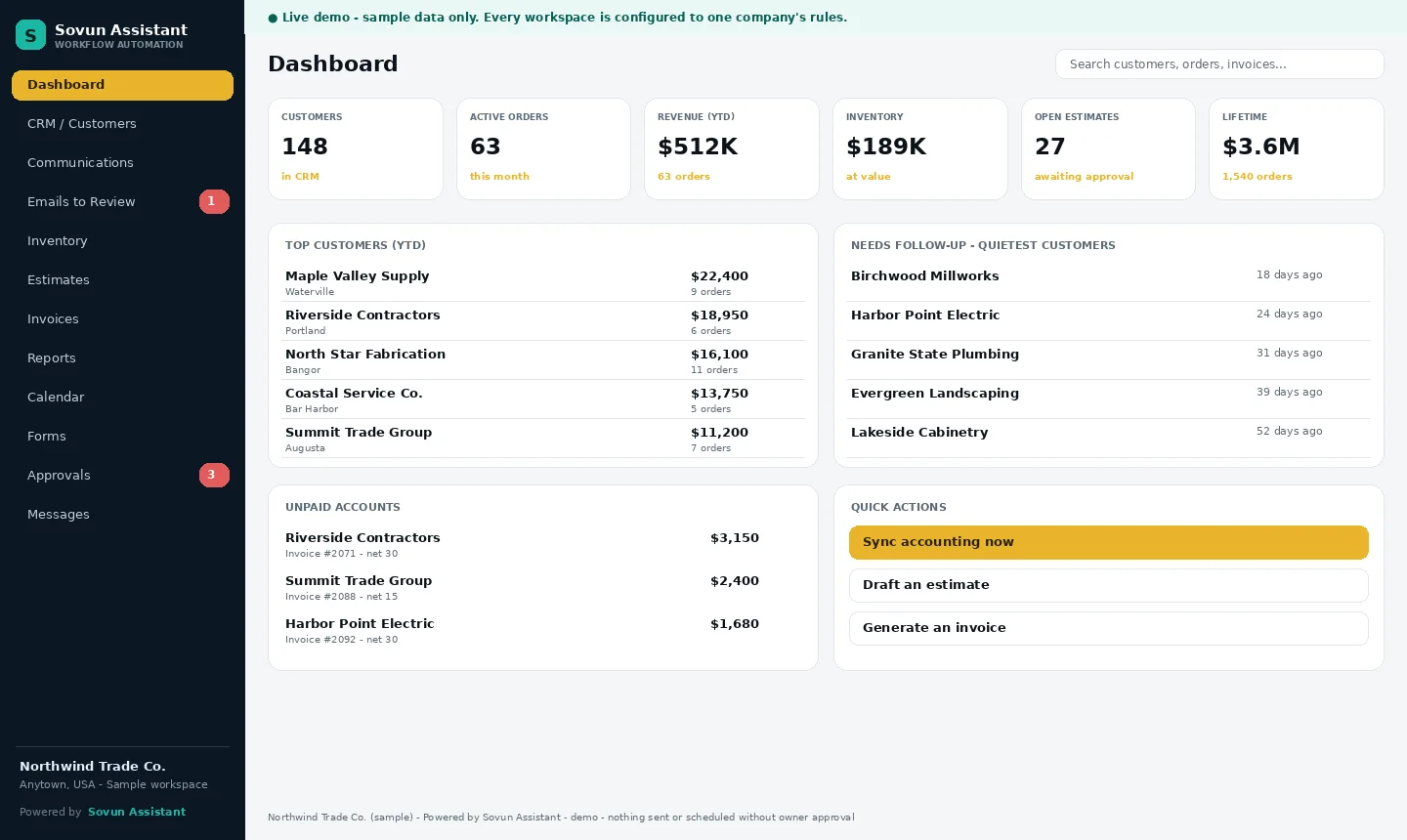
Sovun Assistant helps contractors and service companies turn email, leads, estimates, invoices, payroll prep, scheduling, inventory, files, and daily follow-up into an organized operating system — with the owner still in control.

Company-specific setupOwner approval boundariesReal workflows turned into systems
Email intake ready[email protected] live
Private pilot firsthands-on workflow buildout
Owner-approveddraft, review, approve
What it handles

Practical business operations, not a generic chatbot.

Sovun Assistant is built from the company’s services, pricing rules, documents, customer communication style, approval boundaries, and daily operating rhythm.

01

Email intake and follow-up

Sort incoming requests, summarize what matters, draft replies in the company voice, and flag urgent items for review.

02

Lead and proposal workflows

Capture leads, prepare estimate/proposal drafts, separate known facts from assumptions, and keep pricing decisions controlled.

03

Invoice drafts

Create internal invoice drafts with line items, quantities, totals, and terms before anything is sent or posted to accounting.

04

Calendar drafts

Prepare schedule options, job reminders, and event drafts while final timing and commitments stay owner-approved.

05

Inventory and reorder drafts

Track stock levels, flag low or out-of-stock items, and prepare reorder drafts without purchasing automatically.

06

Payroll prep and time review

Prepare weekly employee-hour summaries, flag missing or unusual time entries, and create accountant-ready notes for owner review.

07

Daily briefings and company memory

Start the day with decisions, messages, follow-ups, records, and approved company knowledge organized in one place.

Pilot approach

Start narrow, prove the workflow, then expand carefully.

Sovun Assistant starts with the work that creates the most friction: inbox intake, follow-up, estimates, invoices, payroll prep, scheduling, inventory, and daily decisions. It prepares the work, keeps records organized, and asks before taking external action.

Live connections to Gmail, Calendar, QuickBooks, Jobber, spreadsheets, and other systems are added deliberately, one by one, with permission and approval rules.

1

Learn the company

Services, pricing, documents, customer tone, approval limits, and recurring work patterns are captured.

2

Connect approved tools

Email, calendar, docs, sheets, CRM/job software, and accounting systems are connected only when authorized.

3

Create reusable workflows

Lead intake, estimates, invoices, payroll-prep reports, calendar drafts, inventory checks, briefings, and follow-ups become repeatable skills.

4

Operate with permission

The assistant drafts and organizes. The owner approves emails, pricing, purchases, schedule commitments, and external system writes.

Safety boundary

Human approval stays in control.

Sovun Assistant does not replace the owner or make final business decisions. Customer-facing messages, invoices, payroll-preparation reports, vendor purchases, pricing commitments, file sharing, and live system changes require human approval.

Who it fits
Best fit

For owner-operated service companies that need follow-through.

Especially useful when the owner is juggling jobs, customer messages, estimates, scheduling, vendors, paperwork, and recurring decisions at the same time.

Good fit for

  • Construction trade businesses
  • Home service and field-service companies
  • Contractors managing estimates, scheduling, paperwork, and follow-up
  • Service teams with recurring intake and customer communication
  • Owners who want help without giving up control

Common outcomes

  • Cleaner inbox and lead intake
  • Faster estimate and invoice drafts
  • Cleaner weekly payroll-prep summaries for accountants
  • Better organized company knowledge
  • More consistent customer communication
  • Daily visibility into what needs attention
Private pilot conversations open

Request a demo around the workflow costing the most time.

Use the form to prepare a clear demo request for , or call . The form does not send automatically yet; it opens your email app with the details filled in so you can review and send.

Direct contact: ·

Demo request form